Creating images is now an important part of online content. Whether it is for blogs, social media, ads, or websites, visuals matter more than ever. In 2026, AI image generator tools make this work much easier, even if you have no design skills.
Instead of searching for stock images or hiring designers, you can create custom images just by explaining what you need. AI image generators turn text prompts into realistic photos, illustrations, and creative visuals within seconds.
In this guide, you will learn how AI image generator tools work, why they are useful in 2026, and which tools are worth trying. This will help you choose the right option based on your needs, whether you are a blogger, marketer, student, or content creator.
Why AI Image Generator Tools Matter in 2026
Visual content is used everywhere today. Blogs need featured images, social media needs eye catching posts, and ads need attractive creatives. Creating these visuals manually takes time and skill.
AI image generator tools solve this problem. They help you create unique images quickly without depending on stock photos or designers. This makes content creation faster and more flexible.
In 2026, these tools are especially useful because they save time, reduce costs, and allow anyone to create professional looking visuals. Whether you create content daily or occasionally, AI image generators help you work smarter.
How AI Image Generator Tools Work
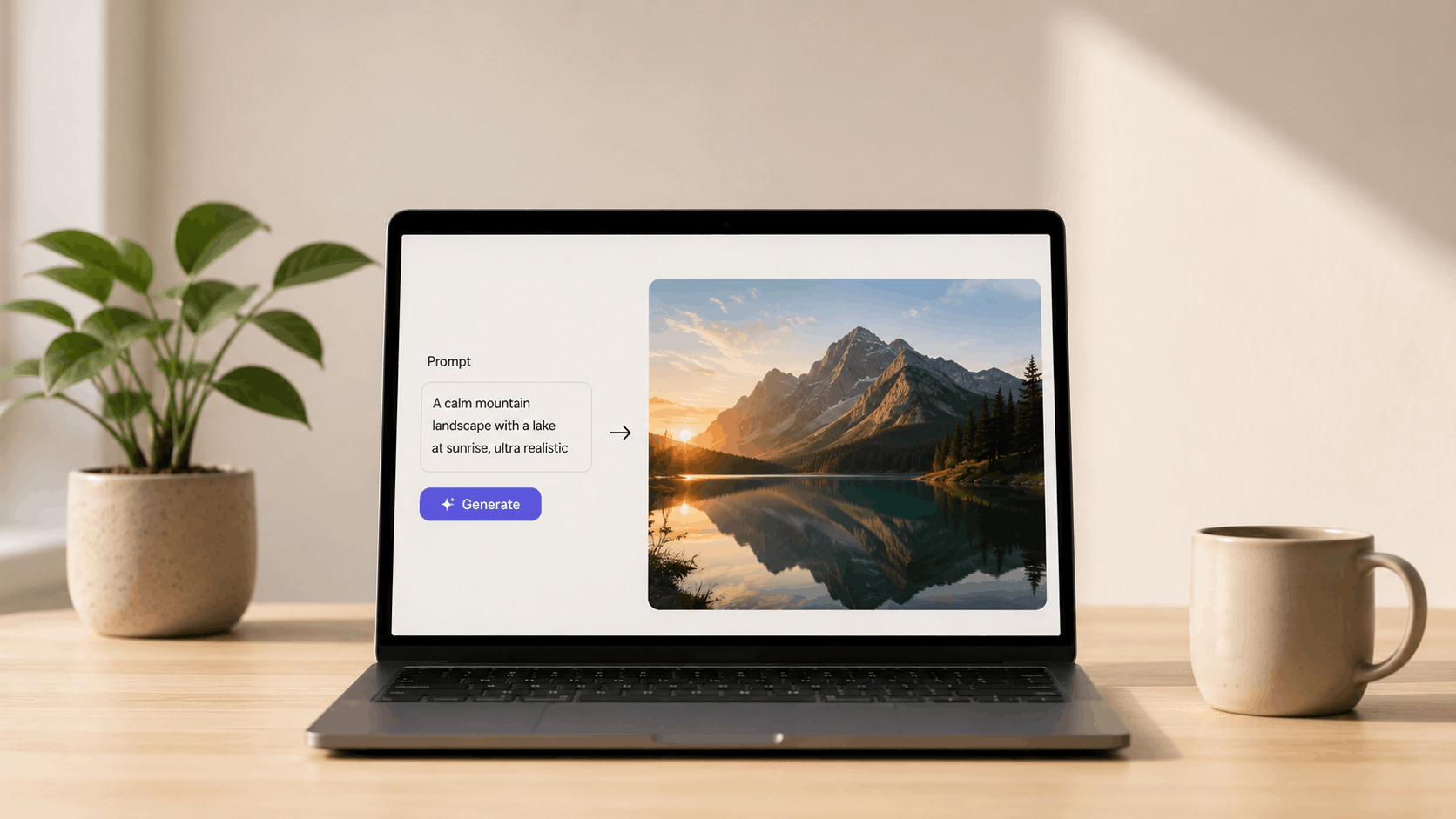
AI image generator tools work in a very simple way. You give a text description of the image you want, and the AI creates it for you.
First, you write a prompt. This prompt explains what the image should look like. For example, style, mood, colours, or type of scene. The clearer your prompt is, the better the result will be.
Next, the AI studies your prompt and generates an image based on patterns it has learned from millions of visuals. Within seconds, you get one or more images that match your idea.
Most tools also let you adjust the image. You can change style, improve quality, or regenerate until you are happy. This makes image creation fast and flexible, even for beginners.
Quick Summary: Best AI Image Generator Tools in 2026
If you want a quick idea of which AI image generator tool does what, this summary will help. Each tool below is good for a specific use, such as realistic images, creative designs, or easy social media visuals.
Use this table to quickly compare tools and choose the one that fits your needs.
| Tool | Best For | Image Style | Free Option |
|---|---|---|---|
| FLUX.2 | High quality and accurate images | Realistic and clean | Yes |
| Ideogram 3.0 | Text inside images | Text focused graphics | Yes |
| Adobe Firefly | Commercial safe images | Clean and professional | Yes |
| Leonardo AI | Game and cinematic visuals | Photorealistic cinematic | Yes |
| NightCafe | Creative experiments | Artistic mixed styles | Yes |
| Playground AI | Style testing | Mixed styles | Yes |
| Seedream | Text heavy visuals and charts | Clean 4K text visuals | Limited |
| Reve Image | Prompt accuracy and characters | Realistic high quality | Limited |
| Google Nano Banana | Photorealistic images with text | Realistic 4K | Limited |
| Midjourney | High quality artistic visuals | Cinematic and artistic | No |
FLUX.2
FLUX.2 is the newer and improved version of the FLUX image models. It focuses on better image quality, stronger prompt understanding, and more consistent results compared to earlier versions.
FLUX.2 works well when you want realistic images and clear control over the final output. It understands prompts more accurately, which reduces the need for repeated regenerations.
How it helps in real use
FLUX.2 is useful when you want images that closely match your description. It works well for blog visuals, website images, and creative projects where accuracy matters.
Key Features
- Improved prompt understanding
- High quality realistic image output
- Better consistency across generations
- Supports reference based generation
Pros
- More accurate results
- Realistic and clean images
- Better than older FLUX versions
Cons
- May feel advanced for beginners
- Fewer artistic presets
Who should use FLUX.2
FLUX.2 is best for creators, designers, and professionals who want realistic images with better control and fewer retries.
Ideogram 3.0
Ideogram 3.0 is an AI image generator known for handling text inside images very well. If you need posters, social media graphics, or images with readable words, Ideogram works better than most tools.
You can type a prompt and include the exact text you want in the image. Ideogram then creates visuals where the text looks clean and properly placed, instead of broken or unreadable.
How it helps in real use
Ideogram is useful when you create thumbnails, banners, quotes, or design visuals where text clarity is important. It saves time compared to manual design work.
Key Features
- Strong text rendering inside images
- Multiple design styles
- Easy prompt based generation
- Simple editing options
Pros
- Best tool for text in images
- Beginner friendly
- Free option available
Cons
- Not ideal for photorealistic images
- Limited advanced editing
Who should use Ideogram 3.0
Ideogram 3.0 is best for bloggers, marketers, and creators who need images with clear and readable text for posts, ads, and designs.
Adobe Firefly
Adobe Firefly is built for creating commercial safe images. It is trusted by professionals because the images are designed to be safe for business use, marketing, and client projects.
You can generate images using text prompts and also control style, colours, and composition. Firefly works well when you need clean and professional visuals instead of artistic experiments.
How it helps in real use
Adobe Firefly is useful for blogs, websites, ads, and brand creatives where image usage rights matter. It fits well into professional workflows.
Key Features
- Commercial safe image generation
- Clean and professional image styles
- Style and colour control
- Works well with Adobe tools
Pros
- Safe for commercial use
- Easy to use
- Free option available
Cons
- Less creative compared to some tools
- Works best inside Adobe ecosystem
Who should use Adobe Firefly
Adobe Firefly is best for marketers, businesses, and creators who need safe, professional images for regular content and client work.
Leonardo AI
Leonardo AI is popular for creating high quality and cinematic style images. It is widely used for game assets, 3D style visuals, and detailed creative images.
You can control styles, lighting, and image details more deeply compared to basic tools. This makes Leonardo AI useful when you want images that look polished and professional.
How it helps in real use
Leonardo AI is helpful when you need detailed visuals for websites, games, thumbnails, or creative projects. It gives more control without needing advanced design skills.
Key Features
- High quality and cinematic image generation
- Style and detail control
- Supports creative and realistic visuals
- Free option available
Pros
- Produces detailed and professional images
- Good balance between control and ease
- Suitable for creative projects
Cons
- Interface may feel complex for beginners
- Results depend on prompt quality
Who should use Leonardo AI
Leonardo AI is best for creators, designers, and developers who want detailed and cinematic images for web, game, or creative use.
NightCafe
NightCafe is mainly used for creative and artistic image generation. It offers many styles and lets you experiment freely, even if you are new to AI image tools.
You simply enter a prompt, choose a style, and generate images. NightCafe also has a community gallery where you can see what others create and get ideas for your own prompts.
How it helps in real use
NightCafe is useful when you want eye catching visuals for blogs, social media posts, or creative projects. It focuses more on creativity than realism.
Key Features
- Multiple artistic styles
- Text to image generation
- Community inspiration and challenges
- Free credits available
Pros
- Easy to start
- Good for creative visuals
- Free option available
Cons
- Not ideal for realistic images
- Limited control in free version
Who should use NightCafe
NightCafe is best for bloggers, creators, and beginners who want creative images without complex tools.
Playground AI
Playground AI is a simple and flexible tool for quick image generation and style testing. It is designed for users who want to try different looks without spending too much time on settings.
You can enter a prompt, choose a style, and generate images quickly. Playground AI is good for testing ideas, experimenting with styles, and creating basic visuals.
How it helps in real use
Playground AI is useful when you want to explore ideas fast. It works well for early concepts, blog images, and casual creative work.
Key Features
- Easy text to image generation
- Multiple style options
- Simple and clean interface
- Free usage available
Pros
- Beginner friendly
- Quick results
- Good for experimentation
Cons
- Limited advanced controls
- Image quality varies by style
Who should use Playground AI
Playground AI is best for beginners, bloggers, and creators who want to experiment with AI images quickly and easily without complex tools.
Seedream
Seedream is known for clear text rendering and clean visuals. It works well when your image needs readable text, charts, or structured elements along with visuals.
You can generate images using prompts and get outputs where text looks neat and properly placed. This makes it useful for educational content, data visuals, and simple design needs.
How it helps in real use
Seedream is helpful when you create visuals that include text, labels, or simple data layouts. It reduces the effort needed to fix text issues in images.
Key Features
- Strong text rendering in images
- Clean and structured visuals
- Fast image generation
- Credit based free access
Pros
- Good for text heavy images
- Clear and readable output
- Easy to use
Cons
- Limited creative styles
- Not ideal for artistic visuals
Who should use Seedream
Seedream is best for students, educators, and content creators who need images with clear text and simple visual structure.
Reve Image
Reve Image is known for strong prompt accuracy and consistent characters. It follows your description closely, which helps when you need images that match a clear idea.
This tool works well when your prompt includes specific details like characters, poses, or scenes. The output usually stays close to what you describe, with fewer unexpected results.
How it helps in real use
Reve Image 1.0 is useful when consistency matters. For example, creating the same character across multiple images or maintaining a similar visual style.
Key Features
- Strong prompt understanding
- Good multi character consistency
- High quality realistic output
- Simple generation process
Pros
- Accurate results
- Less prompt tweaking needed
- Good for story or series visuals
Cons
- Limited free access
- Fewer creative styles
Who should use Reve Image
Reve Image 1.0 is best for creators and designers who need accurate, consistent images based on detailed prompts.
Google Nano Banana
Google Nano Banana focuses on photorealistic images with accurate text. It is designed for users who need clean visuals where details and readability matter.
You can generate realistic images that include clear text elements, labels, or signage. This makes it useful for product visuals, banners, and professional content where clarity is important.
How it helps in real use
Google Nano Banana Pro works well when you want realistic images that look close to real photos. It is especially helpful for visuals that combine images and text.
Key Features
- High quality photorealistic images
- Accurate text rendering
- Supports detailed prompts
- Consistent and clean output
Pros
- Very realistic image quality
- Good text clarity
- Reliable results
Cons
- Limited free usage
- Less creative styles
Who should use Google Nano Banana
Google Nano Banana is best for professionals, marketers, and creators who need realistic images with clean text for websites, ads, and presentations.
Midjourney
Midjourney is known for high quality, artistic, and cinematic images. It is widely used by designers and creators who want visually striking results rather than basic visuals.
You create images by writing prompts, and Midjourney focuses on style, mood, lighting, and composition. The results often look dramatic and creative, which makes it popular for artwork and concept visuals.
How it helps in real use
Midjourney is useful when you want eye catching images for creative projects, inspiration, or visual storytelling. It works well for unique visuals that stand out.
Key Features
- High quality artistic image generation
- Strong control over style and mood
- Consistent visual quality
- Supports detailed prompts
Pros
- Excellent image quality
- Very creative results
- Great for artistic visuals
Cons
- No free option
- Not ideal for text inside images
Who should use Midjourney
Midjourney is best for artists, designers, and creators who want powerful and artistic images rather than simple or realistic visuals.
Who Should Use AI Image Generator Tools
AI image generator tools are useful for many people, not just designers. If you create content or need visuals regularly, these tools can save time and effort.
These tools are helpful for:
- Bloggers who need featured images and visuals
- Marketers creating ads and social media posts
- Students working on presentations and projects
- Content creators posting regularly online
- Small business owners who need visuals without hiring designers
- Designers looking for ideas or quick concepts
If you want good looking images without spending too much time or money, AI image generators are worth using.
Things to Remember Before Using AI Image Generator Tools
AI image generator tools are helpful, but they work best when you use them carefully. They support creativity, but they should not replace your thinking.
Keep these points in mind:
- Always write clear prompts for better results
- Check usage rights, especially for commercial work
- Do not overuse AI images in every post
- Edit or refine images if needed
- Combine AI images with your own ideas
AI tools give you speed, but quality still depends on how you use them. A little effort in prompts and selection makes a big difference.
Limitations of AI Image Generator Tools
AI image generator tools are powerful, but they are not perfect. Understanding their limits helps you use them more wisely.
Here are some common limitations:
- Images may not always match your prompt exactly
- Text inside images can still have spelling or alignment issues
- Hands, faces, and fine details may look unnatural at times
- Styles can feel repetitive after frequent use
- Some tools have limits on free usage or image quality
Because of these limits, it is always good to review and refine AI generated images before using them. When you combine AI output with human judgment, the final result improves a lot.
Final Thoughts
AI image generator tools have made creating visuals much easier in 2026. They help you save time, reduce design effort, and create images that match your ideas without advanced skills.
However, the real value comes from how you use these tools. Clear prompts, smart selection, and a little editing can greatly improve results. AI should support your creativity, not replace it.
Start with one or two tools that fit your needs. With regular practice, AI image generators can become a reliable part of your content creation workflow.
Related Posts
- AI Tools for YouTube Creators: Complete Guide
- Best AI Infographic Generator Tools
- Best AI Thumbnail Generator Tools
- AI Tools for Logo Design
Frequently Asked Questions (FAQs)
Many tools offer free access with limits. Full features usually need a paid plan.
Yes, but always check usage rights, especially for commercial content.
No. Anyone can use them with simple text prompts.
Tools like Canva AI, NightCafe, and Playground AI are easy to start with.
Not always. You should review and refine images before using them.